
Version 2.4.4
20th December 2019
The main program
-
Download Windows Installer
Windows
-
Download Mono Tarball
Mono / Linux / OSX
Installation
Run the installer. Run the server. Go to Tools | Options to configure the program.
Main Changes
- Mobile reports were not loading
- Network connections would keep resetting under Mono 6.0
- Ground vehicles transmitting DF18 CF1 can now be tracked
- User notes now available on map page
- User tag now available on reports
Previous versions can be downloaded from the Version History page.
64-bit Version
The 64-bit version uses more memory than the 32-bit version and cannot load 32-bit third party libraries, which means that features that rely on those libraries will not work. Most Windows users should stick with the 32-bit version.
However, the 64-bit version is preferable if you have feeds with many thousands of aircraft.
There is no Mono 64-bit version because Mono will always run VRS in 32-bits on 32-bit operating systems and 64-bits on 64-bit operating systems.
Plugins
There are no special 64-bit versions of the plugins, they will work unchanged under both the 32-bit and 64-bit versions of the server.
The default install folder for the normal version of the server is C:\Program Files (x86)\VirtualRadar whereas the 64-bit version installs into C:\Program Files\VirtualRadar. If you are installing a plugin on a computer that has both the 32- and 64-bit versions of the server installed then pay special attention to the install folder for the plugin, make sure you enter the correct one. If you want the plugin installed for both servers then you need to install it twice, once for each server installation.
Version 2.4
31st July 2016
Translations of the user interface for the server, the plugins and the web site
Web site translations are included in the standard Virtual Radar Server installation. You do not need to install the language pack to obtain these translations but you can keep them up-to-date using the language pack.
-
Download Windows Installer
Windows
-
Download Mono Tarball
Mono / Linux / OSX
Languages
The following languages are supported:
 [2.4] Português do Brasil / Brazilian Portuguese
 [2.2] 中国 / Chinese
 [2.2] Français / French
 [2.4] Deutsche / German
 [2.4] Русский / Russian
Version 2.4.1
11th June 2018
Adds a web-based user interface to monitor and configure the server
-
Download Windows Installer
Windows
-
Download Mono Tarball
Mono / Linux / OSX
Main Changes
- Support for new server settings
- Did not load properly when host was using de-CH region
Quick Configuration Instructions
Only administrator users can access the plugin. The first step is to create an administrator user.
Via the User Interface
Run the server and go to Tools | Options. Click on the Web Server | Administrators
section and ensure that at least one user is marked as an administrator (if you do not have any users configured
then click the Users section to create one). Click OK.
Via the Command Line
Start the server in headless mode and pass two switches to create and/or configure a user as an administrator:
Mono users: mono VirtualRadar.exe -nogui -createAdmin:name -password:password
Windows users: VirtualRadar.exe -nogui -createAdmin:name -password:password
Note that there is no space after the colon in -createAdmin and -password.
Once an administrator user has been created you can start the server in headless mode using the -nogui
switch.
Accessing the Web Admin Pages
Once the server is running you can access the Web Admin pages at:
http://127.0.0.1/VirtualRadar/WebAdmin/Index.html
Replace 127.0.0.1 with the address (and port number, if appropriate) of the site. Note that by default the plugin only accepts requests from local loopback and LAN addresses.
If you are running the server in GUI mode then you can reach the web admin pages by clicking
Tools | Plugins, then click the Options button for the Web Admin plugin
and click the link in the bottom-left corner of the dialog.
Version 2.4
31st July 2016
Saves flight records (and optionally aircraft details) to a BaseStation.sqb database file
-
Download Windows Installer
Windows
-
Download Mono Tarball
Mono / Linux / OSX
This plugin is for users who do not have a Kinetics radio but want to be able to run the reports. It creates and updates a database that uses the same schema as Kinetic's BaseStation.
There is documentation for the plugin and you can download previous versions here.
Main Changes
- Updated for version 2.4 of the server
- Support for configuring via the web admin plugin
Quick Configuration Instructions
After installation go to Tools | Plugins, click Options against the Database Writer plugin
and tick the Enabled box.
If you are starting a new database from scratch: Enter a filename for the database and click Create Database.
If you are using an existing database: Remove the tick from Only update databases that this plugin created and enter the path to the existing database.
Version 2.4
31st July 2016
Adds support for deep customisation of the Virtual Radar Server web site
-
Download Windows Installer
Windows
-
Download Mono Tarball
Mono / Linux / OSX
Main Changes
- Updated for version 2.4 of the server
- Support for configuring via the web admin plugin
Documentation
There is documentation for this plugin.
Version 2.4.1
11th June 2018
Lets admin users edit BaseStation.sqb aircraft records
-
Download Windows Installer
Windows
-
Download Mono Tarball
Mono / Linux / OSX
Main Changes
- Editing records created by the lookup for missing aircraft could lead to the lookup overwriting them afterwards even when it is told not to
Version 2.4.3
27th July 2019
Caches tiles from Leaflet tile servers
-
Download Windows Installer
Windows
-
Download Mono Tarball
Mono / Linux / OSX
Main Changes
- Initial release
Notes
This plugin keeps a local copy of the tiles that are downloaded from tile servers and serves those copies when available.
Aside from improving map load times and reducing the burden on tile servers it can also be used to provide map tiles when VRS is not connected to the Internet (with the caveat that the tiles would have to have been cached while VRS had an Internet connection).
Version 2.4
31st July 2016
Disables the audio features within Virtual Radar Server
-
Download Windows Installer
Windows
Main Changes
- Updated for version 2.4 of the plugin API
Notes
A handful of users have had problems when VRS tries to enumerate over the text-to-speech voices installed on the system. This plugin stops VRS from doing anything with the Windows text-to-speech sub-system.
The plugin has no configuration options. To re-enable the audio features of the program just uninstall the plugin using the Windows Control Panel.
Version 2.4
31st July 2016
Disables the UPnP features within Virtual Radar Server
-
Download Windows Installer
Windows
Main Changes
- Updated for version 2.4 of the plugin API
Notes
A handful of users have had problems when VRS tries to use the Windows UPnP COM interface. This plugin stops VRS from doing anything with the Windows UPnP sub-system.
The plugin has no configuration options. To re-enable the UPnP features of the program just uninstall the plugin using the Windows Control Panel.
Version 2.0
11th March 2012
A Windows 7 desktop gadget that shows details of the aircraft closest to you
-
Download Windows Gadget
Windows Vista / Windows 7
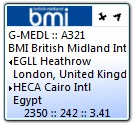
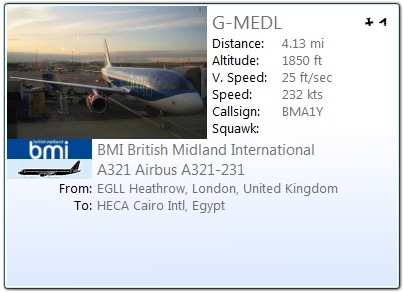
Main Changes
- Fixed a bad memory leak.
- Resolved the problems with ugly text appearing if the gadget lost connection to Virtual Radar Server.
- Added operator and silhouette flags to the docked view.
- Added an indication of heading and bearing to the docked view.
- Added support for configuring the units used for distances, heights and speeds.
- Added a flyout view.
- Removed the indication of how many aircraft are transmitting emergency squawks.
Documentation
There is documentation for the proximity gadget.
Bleeding edge builds of the server, language pack and plugins
From time to time preview builds of the server and the plugins are uploaded to the site to let people try out new features and bug fixes before they are released.
http://www.virtualradarserver.co.uk/Preview.aspx
PLEASE NOTE
Preview versions may have bugs, be incomplete or contain features that end up being removed before release
The source code is hosted on GitHub.
Documentation
There is online documentation for the source. You can also download the documentation in CHM format.
After downloading you may need to right-click the CHM file, choose Properties and click
Unblock before Windows will open it.